
Custom Availability and Time Tracking Limits

By ActiveCollab Team • • 2 min read
cover.png

Hello everyone,

Welcome to the latest news on ActiveCollab’s updates! In our previous post, we talked about recurring tasks and custom availability. This time, we’ll show you how we incorporated the custom availability feature throughout the app and created a better way to control time tracking.

ActiveCollab 8.0: Custom Availability

In the current version, when an employee is on vacation or sick leave, they’ll be marked as unavailable on that day when mentioning them or assigning them tasks.

In ActiveCollab 8.0, setting a person’s availability to 0 hours will mark them as unavailable on that day, and now, we’ve implemented that feature to @mentions and the date picker.
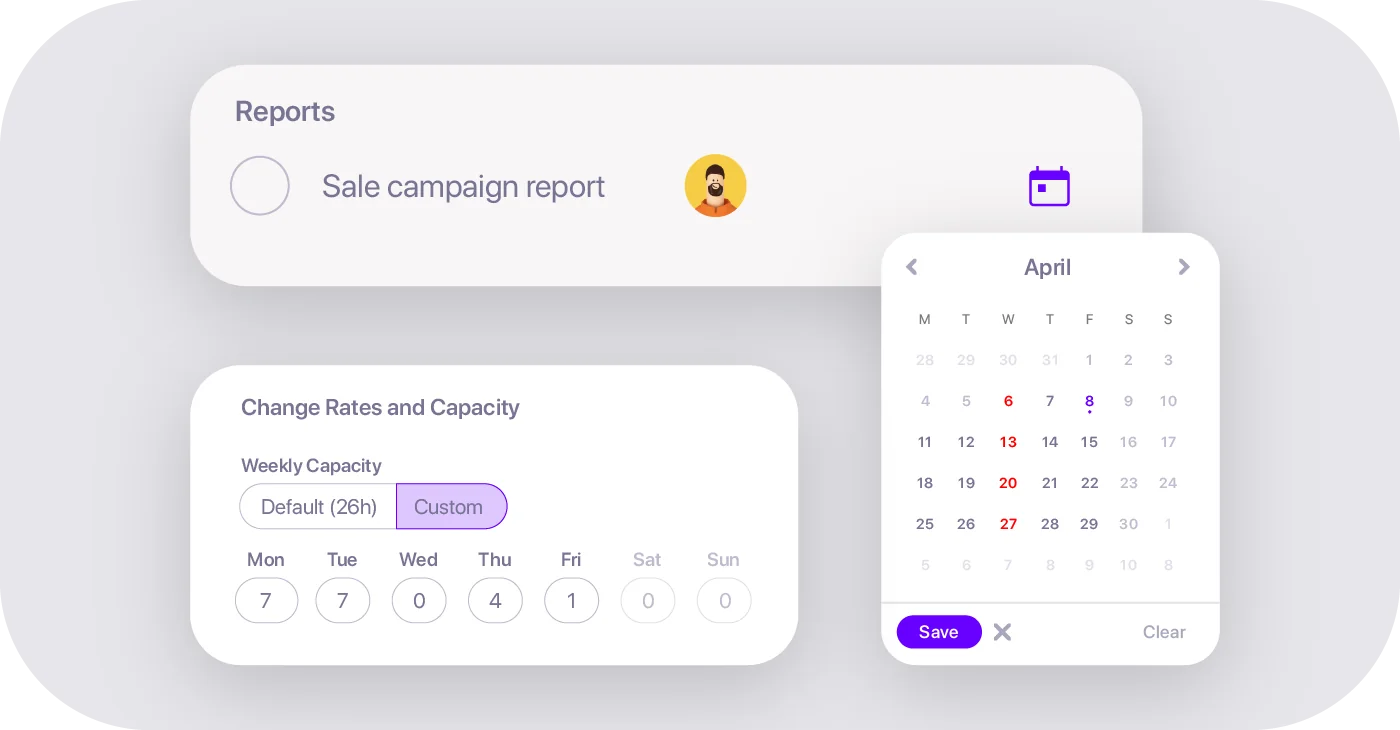

When you try to mention a team member on a day their working hours are set to 0, you’ll get a heads up that they’re not available. The same will happen when choosing a due date for their assignments.

Time Tracking Limits

We’re introducing some new options that should lessen the possibility of making mistakes when tracking time. You can already limit the period of time to add or edit time records in the current ActiveCollab version.
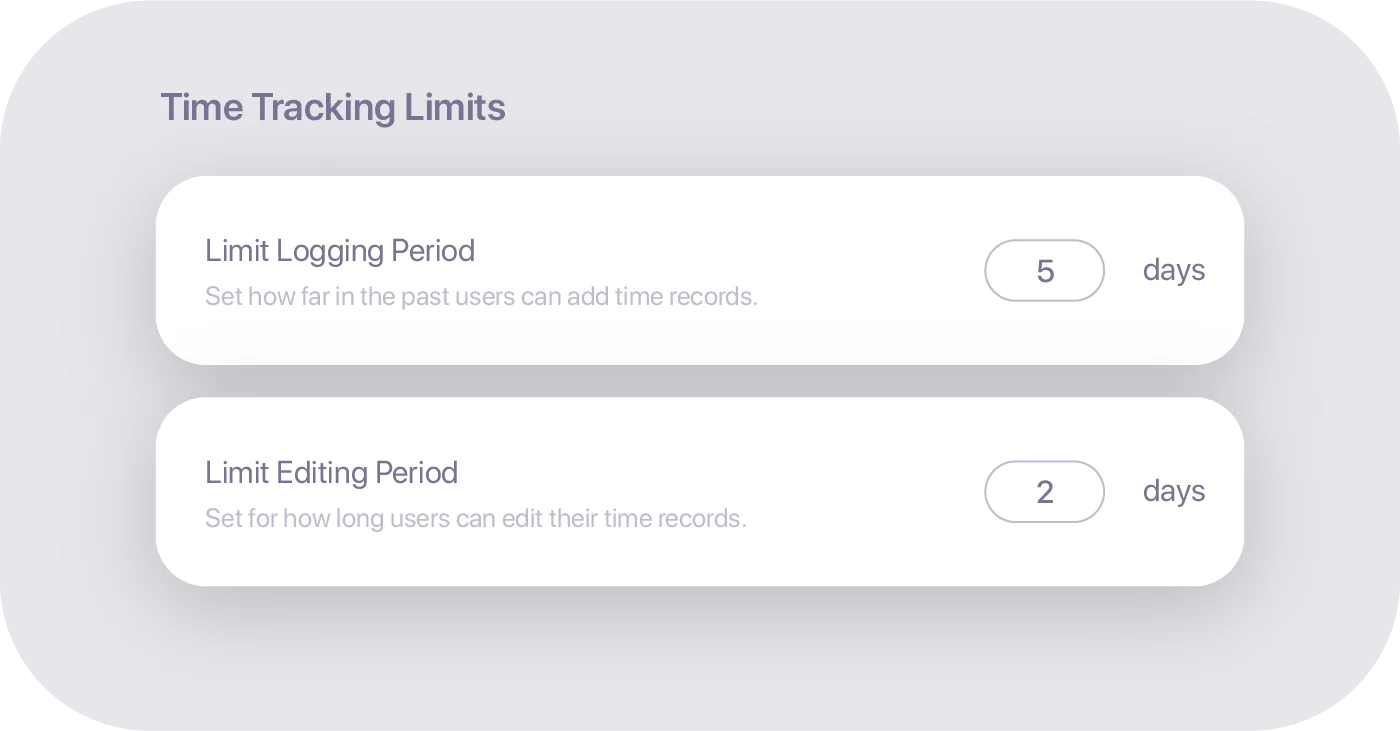

This option should give the managers more control over logged time. For example, by limiting the ability to add time records to five days and editing them to two days, you’ll ensure that the timesheet can’t be modified after one week without the direct involvement of your management team.

We’ve also added internal hourly rates to the new version, so you’ll be able to keep defining the hourly rate for each employee.
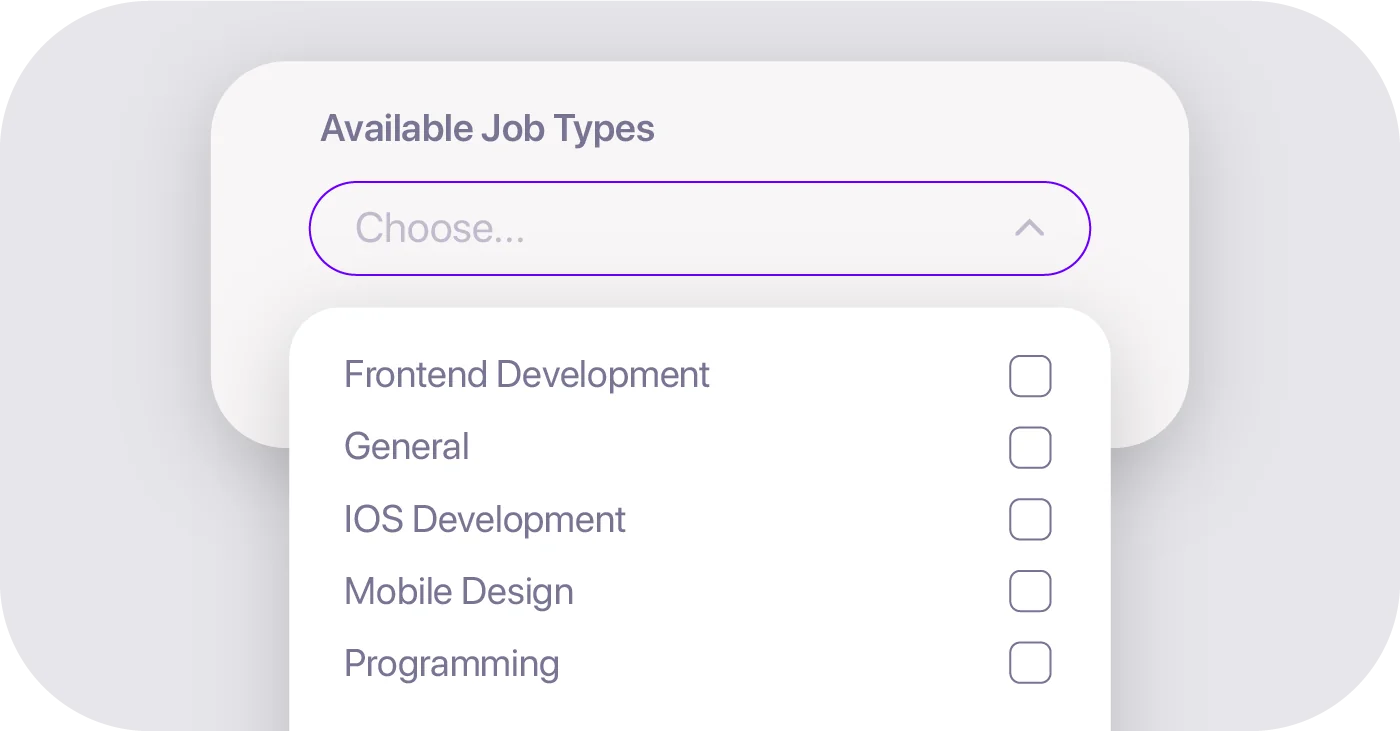

In ActiveCollab 8.0, you’ll be able to choose the available job types for each individual. This option should limit wasting time correcting wrongly logged records.

Uptime

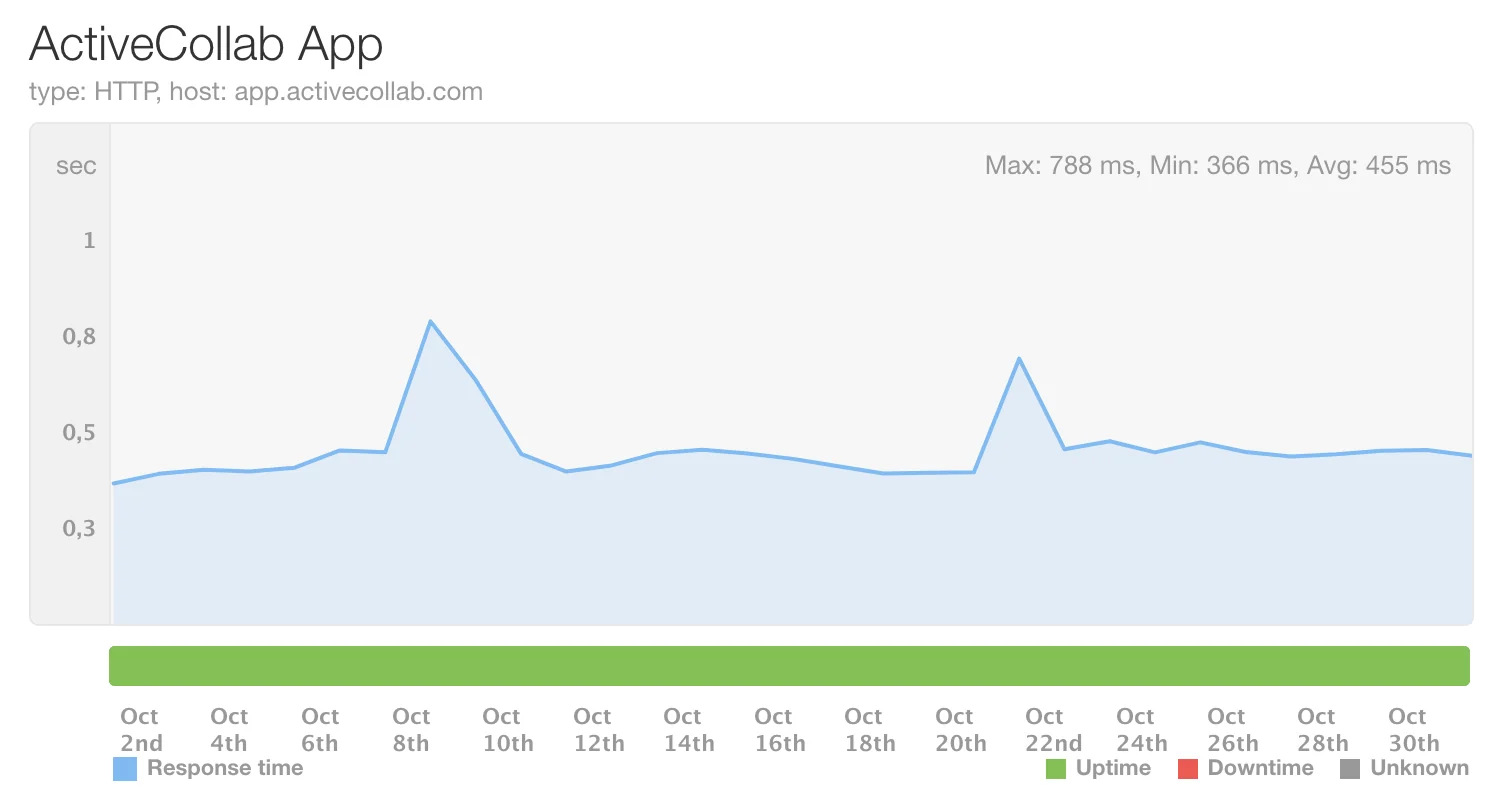
In October, the uptime was 99.99%. If you notice ActiveCollab is slower than usual or down, let us know! You can contact our Support Team via email or X. They’ll be more than happy to give you every information you need.

Coming up

The upcoming month will keep us busy working on security enhancements for your user accounts. Our teams will also be working on time listings in ActiveCollab 8.0.

Stay tuned for more updates!

Other posts in the series on ActiveCollab Monthly Updates

  1. November Recap: ActiveCollab 8 Rollout, Calendar, Task Reports, and Invoices
  2. ActiveCollab 8.0: Virtual Users and User History
  3. ActiveCollab 8.0: Assignments Dashboard, Estimates, User Profile, Teams, and Trash
  4. ActiveCollab 8.0: My Work and Estimates
  5. ActiveCollab 8.0: People Page and Subtasks
  6. ActiveCollab 8.0: Subtask Due Date and Batch Edit
  7. Improved Invitations and Expense Tab
  8. Subtask’s Due Date, People Page Improvements, Comment to Task, and Duplicate Notes
  9. New Comment Options and Time Estimates’ Visibility
  10. ActiveCollab 8.0: Batch Edit Time Records, Early Access Program
  11. Project Timesheet and Stopwatch
  12. Two-factor Authentication and Time Tab Improvements
  13. Custom Availability and Time Tracking Limits
  14. Recurring Tasks on Workload and Custom Availability
  15. Managing Recurring Tasks and Notes
  16. Budget Intervals, ActiveCollab 8.0: Navigate Discussions, Edit Labels, Move Task Lists
  17. ActiveCollab 8.0: User Card, Pin Discussions
  18. Self-Hosted Upgrade, ActiveCollab 8.0: Enhanced Search Page and Subscribers List
  19. ActiveCollab 8.0: Improved Search and Task Navigation
  20. ActiveCollab 8.0: Upcoming Early Access Program
  21. Storage Info, ActiveCollab 8.0: Time Indicators
  22. Improved Search Bar, ActiveCollab 8.0: List View
  23. Group Tasks by Start Date, ActiveCollab 8.0: List View
  24. List View and Task Filtering
  25. Default Tax Rates, Invoice Taxes, Comment Time&Date
  26. Intuitive Task List Reorder, New Task Filters, Magic Link Login
  27. Task Filters, Batch Editing, Project Progress Bar, Overview of Completed Tasks
  28. Template Start Date, New Project Header, Mobile App Stopwatch, Notification Scheduling
  29. Apply Template, G-drive & Dropbox Attachments Previews, Quick Chat Reactions
  30. New Project Icons, Increased Mobile App Speed
  31. ActiveCollab Annual Updates: 2021
  32. Completed Projects Tab, Clickable Timesheet, Mobile App Reminders
  33. New Projects Page, Convert Chat Message to Task, Webhooks Improvements
  34. New Projects Page Header, Chat Reactions, Company Days Off
  35. In-app Chat Launched, Mobile App People Page
  36. Past Workload, Attachment UI Improvements, In-app Chat EAP
  37. New Mobile App Launched, In-app Chat Custom Groups
  38. In-app Chat Improvements, In-app Reminder Notification, Mobile App Beta Testing
  39. In-app Chat Introduction, Default Client Visibility, Stopwatch Project Name
  40. Browser Notifications, Task Dependencies Improvements, In-app Chat EAP
  41. New Mention Types, New Task Menu
  42. Upgraded Editor, Activity Grouping
  43. ActiveCollab Annual Updates: 2020
  44. New My Work Launched, Red Dot Browser Notification
  45. Refurbished My Work, Notification Bell EAP, Invoice QR Code
  46. My Work EAP, Storage Add-on, Self-hosted ActiveCollab 7.0
  47. Default Budget Alert Percentage, Task Improvements
  48. Column View Improvements, Budget Alerts, Availability-based Date Picker
  49. Refreshed Column View, Project Stopwatch, Get Paid Free Tryout
  50. Target Project Budget, New Column View EAP
  51. Default Billable Status, New Project Budgeting Types, Duplicate Task Lists
  52. 90-Day Trial, Time Tracking Enhancements, Uptime
  53. Personal Timesheet, Time Report Custom Date Range
  54. New Time Reports, Sidebar Collapse, Timesheet, Internal Hourly Rates
  55. ActiveCollab Monthly Updates: December 2019
  56. Timeline View Improvements, Future Workload Planning, Project to Template

Related Blog Articles

Discover more articles related to this topic, selected to help you dive deeper into the subject.

Share this post

Get instant clarity,
improve collaboration and profitability.
From a task to an invoice.

Your workspace awaits

Just your email, and the full ActiveCollab is yours to try free - every feature, no limits.


or

By signing up you agree to ActiveCollab's Terms of Service & Privacy Policy.

Great! Just a few seconds, and you're in.

All done! Redirecting you to your account.

Your workspace is one click away.
Check your email to continue.

Sorry, we couldn't create an account for you at this moment.
Please double check your email address. If the issue still persists, please let us know by sending an email to support@activecollab.com


Try Again