
When low employee utilization brings up a red flag, chances are you'll assume one thing: the employee is not performing.
But to the surprise of most business owners, the root cause of most low employee utilization has nothing to do with employee productivity or employee engagement.
In most cases, it’s a deeper, business-wide issue that’s caused by small and large inefficiencies in business operations and processes. Over time, they compound and create a ripple effect across client projects and internal work, before they finally reflect in your profitability statement.
So how do you fix them?
You start with identifying the causes, finding the right solutions and finally tackling them one by one. Because as you’ll find out in this post, to improve employee utilization there is no one-size-fits-all solution you can turn to.
It’s a matter of targeted intervention where the fix is dictated by the cause.
Cause 1: Inconsistent & Inaccurate Time Logs
Sometimes it’s the simple things that derail your operations. Things like inconsistent and inaccurate time-tracking. If you don’t have a user-friendly time tracking tool that your team knows how to use properly, you can end up with a deflated employee utilization rate.
This means all your utilization data will be inaccurate, and your analysis, future forecasting, and decision-making will be in vain.
Here’s how inaccurate time logs lead to false utilization rates:
Missed task logs – Your team forgets or fails to track task time and log all their time into work management tools.
False task classification – Tasks are wrongly classified as billed or unbilled, and work types are inaccurate (instead of writing, they might be labeled brainstorming).
Delayed time logs – Logging in time days after the task is completed messes with time-to-utilization reports and creates a distorted view of workloads.
Fix: Get a tool with a built-in, easy-to-use time tracker & train up
The first step to overcome this issue is to get yourself either a time-tracking tool or better yet, a work management tool with a built-in time tracker like ActiveCollab.
It lets you track time across tasks (even administrative tasks), projects, and clients, where you can customize labels for clear task classifications so you understand who is spending time on what. With a simple check box option for billable or non billable tasks, it categorizes all your team’s work so you can quickly view which proportion of tasks are bringing a profit.
There are two time logging options. Your people can use the stopwatch to track tasks while working, or they can add multiple time logs manually for an individual task.
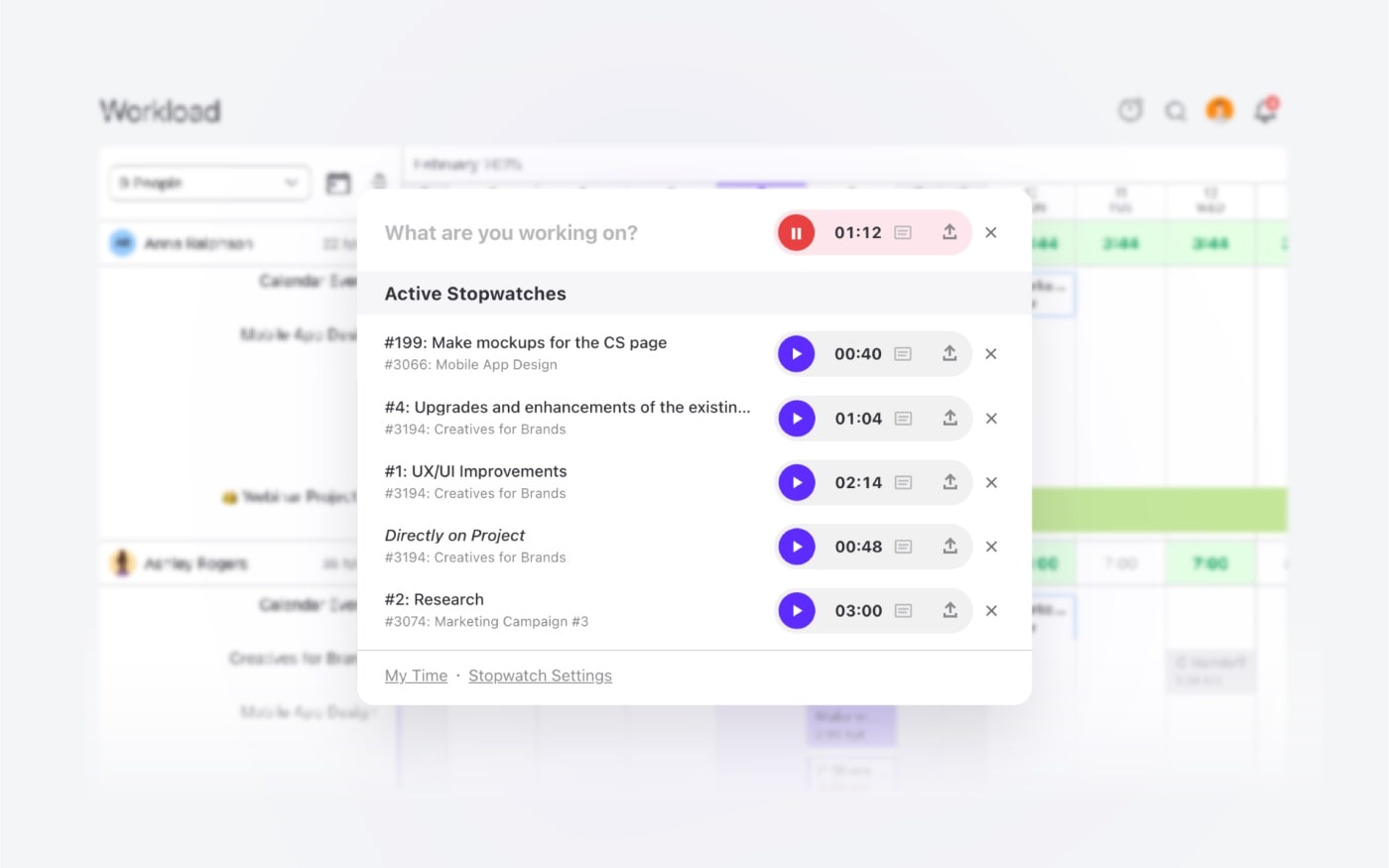
The second step (and the more difficult one) is to change the mindset and culture around time-tracking. Pay close attention to how you position time-tracking to your employees and how you implement it into your processes. Teach your people how to use the tool so it becomes the normal way of working. For tips on how you can do that see our employee time-tracking guide.
Cause 2: Unrealistic capacity baselines
One of the major mistakes many inexperienced professional service firms and business owners make from the very start is to assume 100% capacity for all their employees. This is not humanly possible.
While you may pay your employees for a 40-hour week, they don’t actually spend all 40 hours doing client work. The reality is that your employee’s maximum available capacity baseline cannot possibly exceed 85%. So this means a 40-hour paid week, in reality becomes a 34-hour week. Check out our post on how to calculate employee utilization rates to learn more about available capacity and how to balance workload for optimal employee utilization rate.
The other thing that needs to be said is that not all roles are created equal. Some role types naturally spend a larger portion of their working day on billable tasks, while others are dedicated to operational tasks. This needs to be factored into your resource allocation strategy and employee utilization capacity benchmarks if you want to land a fair and accurate metric.
Fix: Set capacity and utilization benchmarks by role types
One easy way to fix unrealistic capacity baselines is to create your own role-based capacity benchmarks.
Divide your team into key role types and set the capacity benchmarks based on relevant industry standards. Below is a list of the most common role types and their typical available capacity baselines which you can use as a guide. However, you should customize these to reflect your individual business operation.
| Role Type | Available Capacity/Utilization Benchmark |
|---|---|
| Strategist / Consultant | 70-80% |
| Designer / Creative / Writer | 75-80% |
| Developer / Engineer | 80-90% |
| Project Manager / Account Manager | 50-70% |
| Marketing Specialist | 65-75% |
| Data Analyst | 70-80% |
| Admin / Operations | 10-30% |
| Business Development | 0-20% |
| Executive / Leadership | 0-30% |
This will help you get more accurate and valuable insights in monitoring utilization, measuring productivity and determining optimal billing rate.
Cause 3: Too much time spent on non billable tasks
The other big culprit of low employee utilization is an overload of non billable tasks especially if you have remote employees. If your team is spending more than 30% of their work time on tasks that don’t bring money into the business, something is very wrong with your setup.
Four things could be the cause behind too many unbilled tasks:
Inaccurate billing model – You might be classifying tasks inaccurately. Every task that is linked to producing client work should be billed.
Admin & meeting overload – Your processes, a lack of the right business tools and resources, or too many meetings could be eating up valuable client work time.
Business development – Spending too much time on business development initiatives that might be better outsourced.
Prioritization gone wrong – If you are constantly prioritizing unbillable tasks over billable hours of projects in your team’s schedules, your team will focus on the non billable work first.
Fix: Rethink pricing, spring-clean operations, or onboard admin support
If inaccurate billing is your problem, you need to sit down and draw a line that clearly separates direct client work from internal work, and charge appropriately.
This table shows the right division of billable and unbillable work tasks. Use it to classify your work correctly.
| Billable | Non Billable |
|---|---|
| Client meetings and communication time | Admin, HR & internal operations |
| Project research, analysis, reports & consultations | Business proposals, pitches, and scoping |
| Project deliverables, writing, designing, implementing or developing | Employee training & development |
| Revisions and edits of deliverables | Client relationship-building activities |
| Support & maintenance (for retainer contracts mostly) | Client rework due to internal errors |
On the other hand, if the cause is administrative overload, you might need to reconsider your daily operations. Cut back on nice-to-have tasks, automate repetitive tasks, introduce better key performance indicators, and eliminate non-value-added tasks. If you still have a lot of admin tasks distributed across your team, it might be time to hire a full-time support professional.
Finally, if a big chunk of time is being invested in business development initiatives, you might be better off hiring an external business consulting provider. While this does come at a cost, it might be well worth the money (and expertise). With so much of your employees' capacity being dedicated to strategy (instead of billable client work), you’re already losing out on generating a profit.
Cause 4: Mismatched Task Owners & Lack of Training
Another frustrating and stress-inducing cause is mismatched tasks and skillsets that lead to employees struggling to deliver quality work on time.
The two things that could be leading to this scenario are:
Wrong skillset – You might be assigning tasks to people with an incompatible skillset. This is a resource planning issue.
Lack of training – The task owner may need additional training to complete tasks at the standard required to avoid rework.
Fix: Do Skills Mapping & Provide Necessary Training
Many productivity tools like ActiveCollab let you add task types to individuals so they are only assigned the type of work their skillset matches. This is a great way to minimize mismatched task assignments and to make sure you never have a task owner who isn’t capable or experienced enough to deliver the work.
If you know the person is an engaged and talented employee but seems to be struggling with task delivery, it’s always a good idea to provide extra training. Not only will it help them do the work, but it will also boost their confidence and increase motivation and dedication.
Cause 5: Underutilized automation and business operations tools
Finally, if you’re not automating everything that can be automated, you are silently draining your team’s productivity and utilization capacity.
Some of the ways you might be doing this without even noticing it includes:
Manual repetition – Your people might be spending hours on manual, repetitive tasks that can be taken care of with simple automation tools and templates.
Disconnected systems – Working on multiple platforms instead of one integrated tool where everything is streamlined and documented real-time.
Inconsistent automations – Having some team members using automation features while others stick to manual processes creates room for errors and lack of alignment.
Fix: Encourage, adopt & standardize automations
In order for this fix to work, it needs to be business-wide. There’s no point implementing automations in one team if another is going to take it back to manual mode. So tool integration and process automation is something that needs to be led and managed from the very top.
It starts with signing up to a tool that can house, unify and take care of all of your business operations. So you need to consider consolidating your tool stack to one platform (if possible). Remember, your aim is to centralize all the workflows across departments and simplify tasks and client management for everyone involved.
Some of the things you’ll want to consider when choosing your automation tool:
Ease of use & training – Will the tool be easy to learn and use daily or is it going to work only for the tech-savvy teams?
AI and automation features – Does the tool offer the right set of AI and automation features that meet the needs of your team?
SOPs & templates – Do you have ready-made SOPs and templates and can you customize them for your purposes?
Integration options – Does the tool let you integrate with key platforms you need for your business to operate efficiently?
Sometimes, a lack of the tools and underutilized automation features could be the one thing that’s standing between an optimal employee utilization rate, and a low one.
Let ActiveCollab superpower your employee utilization
Improving employee utilization is not about going on a witchhunt for underperforming team members — it’s about uncovering and fixing the everyday causes preventing your people from doing their best work.
Things like inconsistent and inaccurate time-tracking, unrealistic capacity assumptions, task-skill mismatches, and underutilized business tools, make up the core culprits of low employee utilization. Left unchecked, these small issues can cause large-scale problems for your organization leading to skewed utilization metrics, low employee morale and lower profit margins.
But the good news is that all of them can be fixed, relatively quickly with the right platform. A platform like ActiveCollab which centralizes all your teams’ workflows and time-tracking, and lets you customize and adjust each team member’s daily capacity to reality.
By eliminating the friction from task management and time logs, the tool doesn’t just track your team’s productivity, it supports it, so you can support and improve the overall utilization of your team.
Need a tool to be your employee utilization and productivity buddy? Sign up for ActiveCollab’s 14-day free trial or book a demo with one of our people to experience the platform.