
If you've been researching ClickUp versus other project management tools, you'll get to a point where one question keeps popping up:
Do I want a well-known tool that's used by many (but which seems like it requires a whole lot of effort to set up), or do I risk it and just go for the underdog (which actually seems to be the perfect fit)?
Many (in fact) most people might go with the well-known tool, simply because it is that (well-known). But why would you follow the herd and take the long path if there's a shortcut with your name plastered all over it?
This is sort of the scenario with ActiveCollab and ClickUp.
ClickUp's market dominance and flexibility are impressive, but it's a generalist tool – not a specialized one. ActiveCollab, on the other hand, is a purpose-built tool made for the agency user.
That, right there, is probably the main rationale that should be used when deciding between the two tools, but chances are you need more, and that's what we'll give you in this article: four main reasons why ActiveCollab is the better choice, and then we'll reveal how they compare on usability and value for money.
What makes ActiveCollab the best ClickUp alternative in 2026
Loads of businesses use and trust ClickUp.
But if you're an agency or client-services business that needs an all-in-one work management platform that's less complex and overwhelming, then ActiveCollab is an Clickup alternative you need to look into.
ClickUp may offer endless flexibility and customization options, but that's also what makes it complex and overwhelming for many users.
So, if you had to choose between a powerful generalist platform (like ClickUp) and a "just right" tool that's been designed for agency workflows (ActiveCollab), which would make more sense?
For agency and service business founders, ActiveCollab simply makes more sense.
Most client-driven teams don't need the extensive customization options ClickUp offers. They need clarity, connection, and centralization. And that's exactly what ActiveCollab brings to the table.
It's a tool that connects:
- Project work to revenue
- Your teams with clients
- Tracked time with workloads and capacity plans
- Invoices with payments
And when you've wrapped up a project, you can jump into reports and see how viable and worthwhile that project was.
Did you undercharge?
Did you underestimate the amount of time individual tasks would take?
What proportion of the team's tracked time was divided into billable and unbillable work?
These are all questions ActiveCollab's reports and dashboard will let you answer.
So in a nutshell, ActiveCollab goes way beyond simple task management. It gives you all the built-in agency tools you need to run an efficient, profitable, and growing agency business.
While ActiveCollab consolidates core features like time tracking, budgeting, billing, and resource planning, and wraps them up into one ready-made, easy-to-use platform, ClickUp is a tool you need to set up and configure.
On top of that, to get that end-to-end client workflow that takes you from quote to invoice, you'll need to turn to add-ons and integrations.
If delivering projects efficiently and profitability is what you care about most, then ActiveCollab is a tool worth trialling.
Why? Because it will solve the core operational pain points service businesses face daily, like:
- Tracking client work progress to the finish line in a way that doesn't demand extra brain cells to work out what needs your attention
- Managing team workload by having a bird-eye-view of who's doing what, who's got more than they can handle, and who's free to take over.
- Fragmented workflows where project docs sit on one drive and plans and timelines on another app, which leaves the team constantly switching between screens and wasting time.
- Scattered and inefficient client and team communication that spread across email, apps, and various documents, resulting in missed messages, edits, feedback, and approvals, leading to confusion and rework.
ActiveCollab runs agencies, ClickUp runs any type of business
Every tool has its own unique value proposition. If you look at the value proposition of ActiveCollab vs ClickUp, it might look something like this:
ActiveCollab: One platform to run your entire agency and client project workflow operation, end-to-end.
ClickUp: One platform to run any type of workflow you want to set up and build out.
So if you're a marketing or advertising agency, a creative studio, or a consultancy, ActiveCollab will give you all the capabilities you need, out-of-the-box – no adjustments, add-ons, or individual setup needed.
But if you go with ClickUp, even though you get almost all the core features ActiveCollab offers (minus invoicing and payments), you'll need to spend some time configuring your workflows to fit the client service work model.
Even though ClickUp is a great tool for teams that need extensive customization options and offers unmatched flexibility, it could be overkill for small to mid-sized teams. It comes as a blank canvas. One where you can build out different structures and set up workflows for different teams, so you have a tailor-made work management platform that's actually better suited for larger teams and operations with multiple departments.
The fact that ActiveCollab is a specialized tool is what makes it more suitable for running an agency. It's a complete hub that gives you comprehensive project management features, resource and client management, collaboration, and built-in financial tools.
So ActiveCollab is purpose-built to serve agency needs, specifically.
ActiveCollab connects time to billing to profitability, ClickUp relies on integrations
Another thing ActiveCollab does better is connect the time, money, and client work dots.
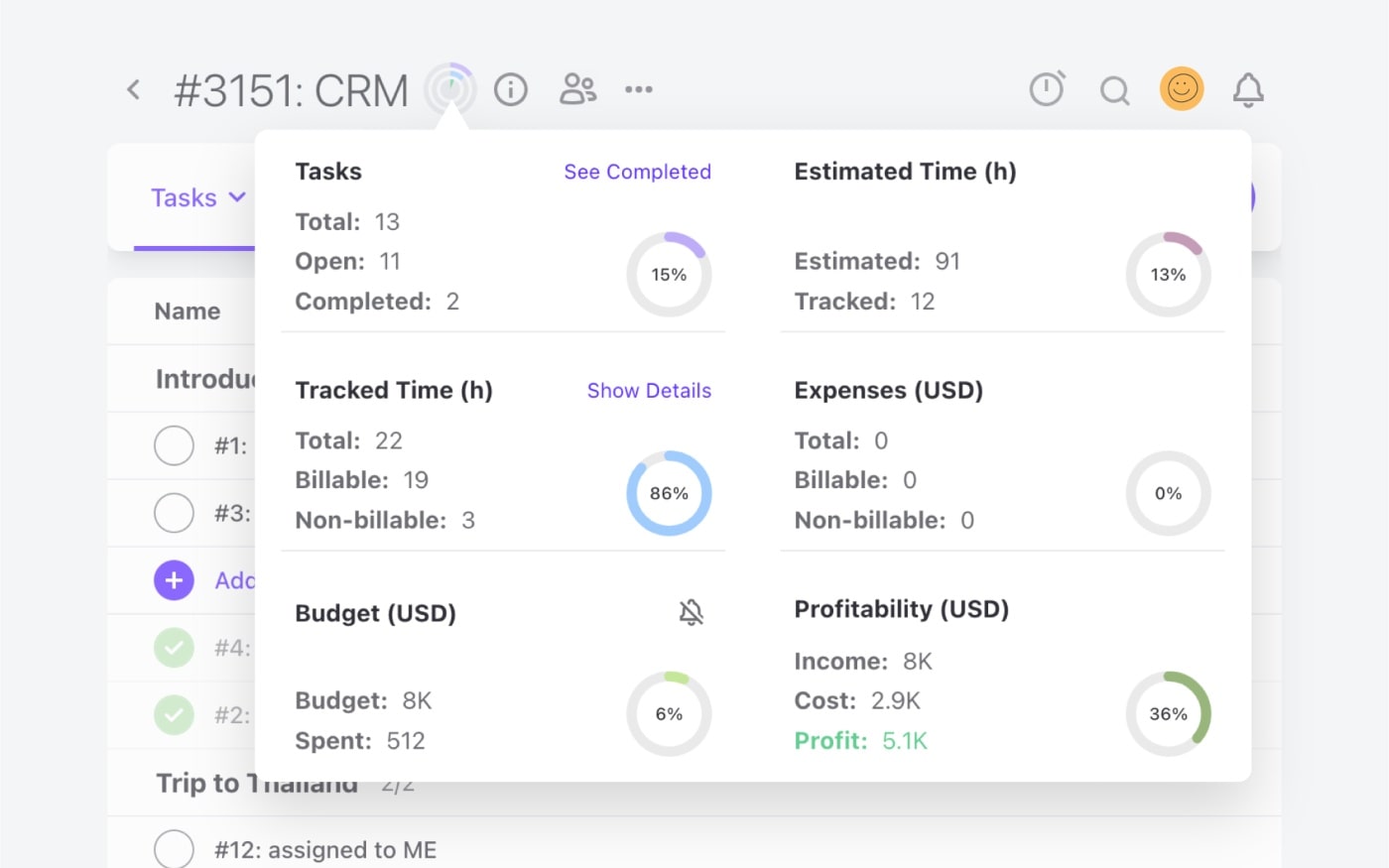
In ActiveCollab, tracked task time is directly tied to project budgets, expenses, and invoicing. So the platform automatically creates invoices from tracked hours, which you can edit, send to clients, and have them make instant payments.
On top of that, you have project overview and profitability dashboards (budget vs. cost tracking), which you can view daily to pick up potential losses early. All these built-in features (which are crucial for service-based businesses) are features that ClickUp cannot match natively.
Because ActiveCollab tracks revenue (billable work) against costs in one interconnected system, agency leaders can stay on top of project margins and make sure they are pricing their clients in a way that makes them operate profitably.
On the other hand, if you look at ClickUp, it may offer loads of project management features, but financial tools are not its core focus or strength. It does have built-in time tracking and custom fields you can adapt and use for budget info and various dashboard measures, but it lacks native billing and comprehensive profitability reports.
If you wanted to reflect that end-to-end workflow that exists as a ready-made system in ActiveCollab, in ClickUp, you'd need to turn to integrations with dedicated billing or accounting software.
For agencies that need to track billable and unbillable hours, manage budgets, send invoices and reminders, let clients make payments, and have all that info nicely presented in a report or dashboard, ActiveCollab gives you superior value.
With real-time visibility into time, project costs, and profitability, ActiveCollab helps you understand and manage utilization, so you stay out of the red.
ActiveCollab lets you partner with clients, ClickUp demands configurations
Even though both project management tools offer options for inviting clients and guests, ActiveCollab makes it easier and requires less prep work.
In fact, it streamlines client management, project collaboration, and client communication in a way that ClickUp can't. Instead of overwhelming users with pre-work setup and guest access caps, ActiveCollab lets you invite clients instantly. All you need to do is provide their email and click on the level of access you want to give.
You have two client access options:
- Client Role (free) – Made for basic project visibility, ideal for external collaborators. Guests with Client Role can view tasks they've been given access to, create discussions and notes, add files, and edit and delete discussions or notes they have created.
Client+ Role (paid) – Made for advanced collaboration, where clients can create, open, assign, and be assigned tasks. They can also view who's on the project and see budget details.
So you might let a client see task lists and comments, but keep internal team discussions, time logs, and expenses private. This kind of flexibility is super useful for agency operations because it means that while you keep all collaboration centralized in one platform, so everyone sees the same info, you still have control over who sees what.
Achieving the same setup with ClickUp can be done, but it requires more manual configuration.
First, you need to invite the client to the relevant workspace, then you need to share individual folders, lists, or tasks, before you finally manage specific permissions. When it comes to permissions, in ClickUp you have four options:
- View Only – View and print tasks or documents and all standard fields.
- Comment Access – Add new comments or attachments and reply to existing ones, assign comments to team members, edit and delete their own comments, change task status, and add or remove assignees.
- Edit Access – Edit existing tasks, add and change assignees, and move and merge tasks.
- Full access – Almost full member access, where guests can create or delete tasks, archive and convert tasks, and manage custom fields.
The other thing you need to be aware of is that on ClickUp's paid plans, you get a limited number of guest seats per member.
So if you weigh up the strengths of the two platforms, ClickUp emphasizes internal team communication tools and collaboration features. ActiveCollab, being more agency environment-focused, levels out team project collaboration with client interaction and communication. This is what makes it ideal for agencies that partner with clients at a deeper level, and don't just work on a send-and-approve basis.
ActiveCollab is a project management solution built to handle client feedback, approvals, and even share time/cost data when needed, without overwhelming users.
ActiveCollab does intuitive workload management, ClickUp needs extensive setup
Finally, another thing ActiveCollab makes easier for agencies to take care of is workload management and capacity planning. This is a serious pain point that can make or break your team and business.
While ActiveCollab boasts a ready-made plug-and-play workload management feature, ClickUp demands you manually set up the structure of your workload metrics.
With ActiveCollab, the moment you log in, Workload view is available on the side navigation menu and here's how the feature works:
- You set each team member's daily capacity in hours (this automatically sets the capacity in workload)
- Assign tasks and estimates (as you assign tasks and set time estimates, these will feed into workloads)
- Monitor workloads, make changes as necessary (with color-coded indicators for over- and under-utilized, you can quickly spot people that are at risk of burnout and those that have capacity)
On top of that, ActiveCollab's time off and availability management are other features you can take advantage of, so your workload views account for and reflect individual annual leave days and public holidays. With a visual dashboard that automatically populates and updates used and available hours, you can actually do capacity and resource planning that works in reality, not just on paper.
This simple setup helps agency team managers prevent overallocation, without making it overwhelming or time-consuming. If over- or under-allocation does happen, or if task time estimates were off, you can immediately tweak task allocations and balance workloads across teams and projects via the instant drag-and-drop feature.
With ClickUp, there's a more granular setup involved.
To manage workloads via the handy drag-and-drop feature, you first need to define capacity for each user and decide whether you're going to measure it by task count, hours, or points. If you're an agency (no matter whether you charge by the hour or per project), you still organize your work based on individual working hours, so these other metrics are unnecessary.
So if you're an agency or business that likes to customize how workload is calculated, ClickUp will be fine, but if you prefer to have a platform that does all the structure and thinking for you, and you just manage and move tasks around, then ActiveCollab is what you're looking for.
In a nutshell, ActiveCollab's focus on resource management and preventing team burnout is a core, out-of-the-box strength.
To achieve the same visibility in ClickUp, you'll need to invest some serious time into the setup, and you may need a dedicated administrator to manage it.
ActiveCollab vs ClickUp: Which is easier to use?
For project tracking, scheduling, and collaboration, having a tool your team will adopt and be able to use quickly and easily is a game-changer. Usability is quite simply a major factor when it comes to choosing your project management solution, task management, and agency operations tool.
When you look at ActiveCollab vs ClickUp, usability is without a doubt the greatest point difference.
While ActiveCollab's learning curve is super gentle and almost non-existent, ClickUp is complex and overwhelming. Users who've had the pleasure of using both will tell you the two tools sit on opposite ends of the ease-of-use scale.
ActiveCollab is:
- Highly intuitive, user-friendly, and quick to set up (almost instant)
- Designed for simplicity with a clear and agency-centred layout
- Focused on providing a ready-made, instantly usable feature set
- Logical and integrated in a way that connects all the moving parts of agency project management (projects, tasks, time-tracking, workloads, budgets, collaboration, and client management)
ClickUp is:
- Powerful and flexible, but it needs to be configured and set up to follow your workflows
- A tool with a complex interface and multiple menus (Spaces, Folders, Lists, views, dashboards, etc.)
- Feature-rich blank canvas with many options, which make it adaptable to any business workflow type but you may need an administrator to get it set up the way you like
- A platform for tech-savvy users who like to experiment and are willing to invest time into training their team on how to use the tool effectively
So the bottom line here is that ClickUp is great once you get the hang of it. But if we are comparing the two tools based on user-friendliness, ActivCollab is much less intimidating and requires less onboarding time to master and use the tool to its full capacity.
When you compare ActiveCollab & ClickUp, which offers better value for money?
This is a difficult question to answer because it really depends on where your values lie.
If more features and customization depth are what you're after, then ClickUp might offer more value for money.
However, if your value lies in having one easy-to-use, end-to-end agency project management tool that's ready to use instantly and consolidates a bunch of tools you'd normally pay for separately, then ActiveCollab's your winner.
Both tools will give you a comprehensive all-in-one suite, and both will let you scale your operations without losing sight of all the moving parts of your client work. However, they demand different levels of attention when it comes to setup.
If your priority is simplicity, interconnectedness, and client collaboration, ActiveCollab presents better value for money. With built-in time-tracking, project management, billing, team and client collaboration, budgeting, and business profitability, you can save on multiple tool subscriptions and have your entire agency ecosystem housed in one neat work hub.
ActiveCollab: The "just right" agency workflow management tool
So we've given you a straight-up ClickUp comparison and told you that both tools are solid options for teams that need an all-in-one solution. But if you're an agency, a creative studio, or a service business that works with and for clients day-to-day, ActiveCollab is the tool that's going to feel "just right".
Why? Because it's a ready-made mix of all the features a fast-paced team needs, and that actually makes sense for client services workflows. It's a tool that connects everything – time-tracking to budgets, tasks to workloads, billed hours to invoices. Then, it takes all the information to generate productivity and profitability dashboards so you get invaluable business insights.
Unlike ClickUp, where you have to build your structure from scratch, ActiveCollab's default status is the finished product made for instant agency use. It's a tool that keeps your company running like a well-oiled machine without stitching together multiple add-ons.
ActiveCollab is a tool that works for both small teams and medium-sized businesses. Our sweet spot is teams of 5-50 people – that's where you can really get the most out of all the features. But loads of micro-teams use us, especially startups just getting their business off the ground.
So if you're a client-facing business and you're looking for the best ClickUp alternative to run your entire agency or service business show, then you need to sign up for ActiveCollab's 14-day free trial.
We give you a centralized ecosystem that drives your creative delivery, manages your team, and supports client collaboration in a way that promotes and makes relationship building easy and smooth.
If you prefer to speak to a human, book a demo with one of our people to walk you through the entire platform so you can see what it can do for you!