Nine tools agencies move to from Asana, and who each one suits. Pick ActiveCollab if you want time tracking, budgets and invoicing on one plan at $15 per user. Stay on Asana if its free plan for up to 2 people covers you.
Prices checked on each vendor's pricing page ·
Last updated
· Reviewed by Mirjana Dobrijević, Account Executive
1 · Plan, track and bill on one plan
ActiveCollab
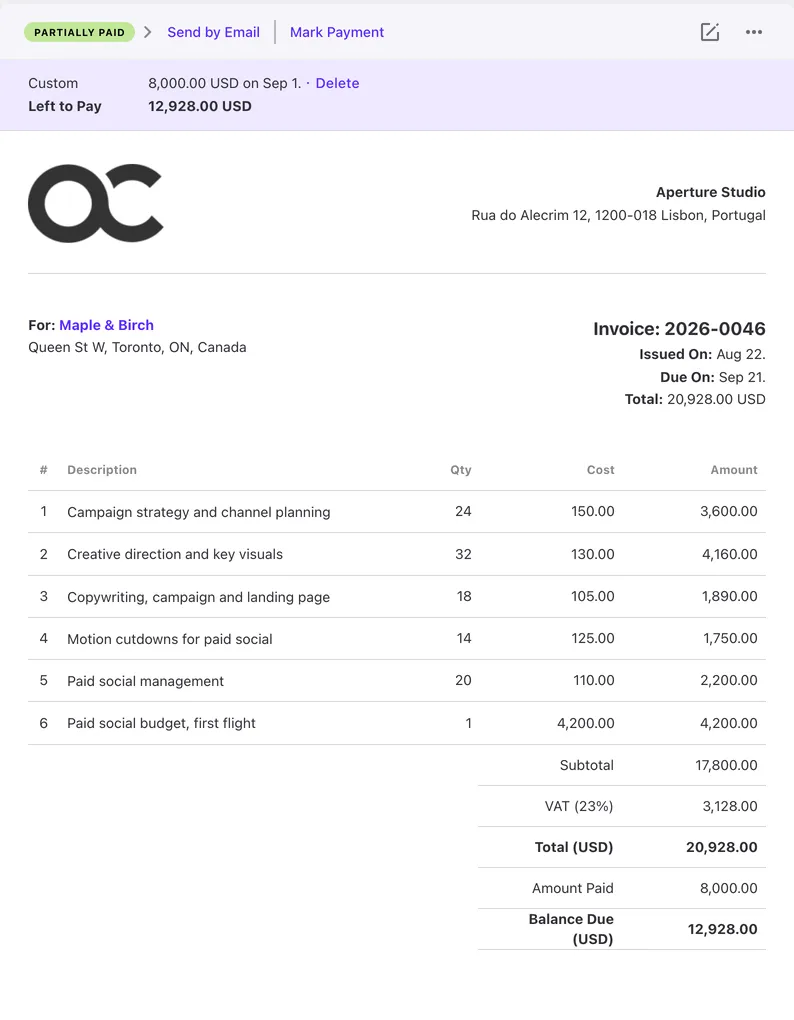
Invoices from tracked time, budgets and profitability on Pro + Get Paid at $15 per user. Asana's pricing page lists native time tracking on Advanced and no invoices from tracked time. Clients: Free and unlimited on every plan. Runs in the cloud or on your own server.
Good at
Plus: $12.50 a month flat for up to 3 members
Free Client role on every plan
Self-hosted with a one-time license, with optional support package
Importer for CSV and Excel exports from other tools
Weaker at
No free plan, 14-day trial
No scheduling by role or skill
No built-in CRM
Workflow automations: Not offered · recurring tasks on every plan
“But the greatest breakthrough was when we started using the invoicing section.”
In ActiveCollab: Plus is $12.50 a month flat for up to 3 members. monday.com's Basic is $9 a seat, with a 3-seat minimum.
ClickUp
Good for: Agencies and teams that will set up one workspace for tasks, docs, time tracking and chat
Pick ClickUp if
You want a Free Forever plan with unlimited members and tasks, or a paid plan from $9 a user.
You want tasks, docs, chat and whiteboards in one workspace.
You want AI built into the workspace, with a monthly credit allowance on every plan.
Weaker at
Setup is on you: ClickUp's own comparison page says someone configures Spaces, Lists, statuses and templates, and reviewers keep naming the learning curve.
Smallest paid planCore · $9/user; Business $17/user · billed yearly
checked
In ActiveCollab: tracked time becomes a client invoice on Pro + Get Paid, with budgets and profitability reports. ClickUp's pricing page lists no invoicing.
Teamwork
Good for: Agencies and consultancies that deliver client projects and bill by the hour, with a free plan to start
Pick Teamwork if
You want a free plan for up to 5 users and 5 projects.
You run retainers and need time budgets per client on Accelerate.
You schedule people by role or skill. That is on Optimize, priced on request.
Your team already works in Teamwork and invoicing is not the pain.
In ActiveCollab: Gantt and task dependencies are on every plan. Trello's Timeline view starts on Premium at $10 a user, and it has no built-in task dependencies.
When to stay on Asana
You want a free plan for up to 2 people.
You want timeline and Gantt views, reporting dashboards and unlimited automations from $10.99 a user.
You want goals, portfolios and resource management on one platform.
All ten at a glance
Picking a tool is hard enough without digging through ten pricing pages. Here's what each one costs a team of 10. Prices per user per month, billed yearly.
Feature
ActiveCollab
monday.com
ClickUp
Teamwork
Nifty
Scoro
Productive
Wrike
Trello
Asana
Invoices from tracked time
Pro + Get Paid · $15/user No minimum team size
Not listed for monday work management; monday CRM lists quotes and invoices
Not listed on the pricing page
Accelerate · $24.99/user, minimum 5
Not listed on the pricing page
Standard · $17/user with Track and Invoice, minimum 5
Every plan, from Essential · $10/user, minimum 3
Not listed on the pricing page; Pinnacle budgets use billable hours and bill rates
Not listed on the pricing page
Not listed on the pricing page
10 people on that plan, per month
$150
No invoicing listed
No invoicing listed
$249.90
No invoicing listed
$170
$100
No invoicing listed
No invoicing listed
No invoicing listed
Client access
Free Client role on every plan No paid extra, no seat taken
Free read-only viewers from Basic; guest access from Standard
Free guests on Free; paid plans add a limited number of guest seats and unlimited read-only guests
Free client users, up to 5 active projects each
Guests and clients included: 5 per paid seat on per-member Pro; unlimited on flat plans and per-member Business
Customer portal is a paid extra on any combination; its price is not listed
Clients can see approved tracked time through budget access, on Professional and Ultimate
External users take a paid seat; limited users can be free viewers
Single-board guests on Standard; observers on Premium; multi-board guests on Enterprise
Unlimited free guests from Starter
Self-hosted
Yes · one-time license, with optional support package The only one you can host yourself
Cloud only
Cloud only
Cloud only
Cloud only
Cloud only
Cloud only
Cloud only
Cloud only
Cloud only
Free plan
No, 14-day trial
Free plan · up to 2 seats
Free Forever plan · unlimited members, no credit card required
Up to 5 users
Free plan · unlimited members, 2 projects
No free plan listed · 14-day trial
No free plan listed · 14-day trial
Free plan · no credit card required; limits not stated on the pricing page
Free plan · up to 10 collaborators, 10 boards
Personal plan · free forever, 2 users
Smallest paid plan
Plus · $12.50/mo flat, up to 3 members One flat price for the first 3 people
Basic · $9/seat, minimum 3
Core · $9/user; Business $17/user
Basics · $9.99/user, minimum 3
Pro · $10/member, which Nifty suggests for teams under 7; $79 a month flat for up to 10 people
Standard · $17/user with Track and Invoice, minimum 5
Essential · $10/user, minimum 3
Team · $10/user, 2 to 15 users
Standard · $5/user
Starter · $10.99/user
Time tracking
Every plan, with stopwatch Time tracking is on every plan, Plus included
From the Pro plan
Included from Core; a trial on Free
Every plan; billable reports from Basics
From Pro: Time Tracking & Reporting
Track app: time tracker, timesheets, billable time
Every plan, from Essential
From Business · $25/user, minimum 5; not on Free or Team
Not listed on the pricing page
Native time tracking on Advanced; through integrations on every plan
Gantt and task dependencies
Every plan
Timeline and Gantt views from Standard; dependencies from Pro
Gantt from Core, limited uses on Free Forever; dependencies on every plan
Every plan
Task dependencies on every plan; Roadmap (Gantt) view, plan not stated
Gantt chart and task dependencies in the Deliver core app
Gantt layout and task dependencies from Professional
Gantt chart and task dependencies from Team
Timeline view on Premium; no built-in task dependencies
Timeline, Gantt and task dependencies from Starter
Minimum seats and contract
No seat minimum · Plus is capped at 3 members · monthly or yearly billing, cancel any time
3 users minimum · monthly or yearly billing
No seat minimum listed · monthly or yearly billing
Basics 3 users, Accelerate 5 · monthly or yearly billing
No seat minimum listed · monthly or annual billing
5 users minimum · monthly or yearly billing; no longer commitment unless agreed
3 seats minimum on every plan · monthly or yearly billing
Team 2 to 15 users, Business 5 to 200 · Business and above annual only
No seat minimum listed · monthly or yearly billing
No seat minimum listed · monthly or yearly billing
Price checked
Our own pricing
Spot something wrong or out of date? Write to support@activecollab.com and we will fix it. That goes for every vendor listed here too.
Half of the teams that track time log their first hours by day four.
Source: ActiveCollab account data, Nov 2025 – Oct 2026.
Questions buyers ask
What is the best Asana alternative for an agency?
It depends on what Asana did badly for you. Invoices from tracked time: ActiveCollab, with Pro + Get Paid at $15 per user, while Asana's pricing page lists none. Budgets and resource planning: Productive. Quotes, CRM and billing in one suite: Scoro. A free plan with unlimited members: ClickUp.
Which Asana alternative can I host on my own server?
Only ActiveCollab. Self-Hosted runs on your own server with a one-time license and an optional support package. The other nine tools on this page are cloud only.
Which of these have a free plan?
ActiveCollab has a 14-day trial with every feature and no free plan. Asana: Personal plan · free forever, 2 users. Teamwork: Free plan · 5 users, 5 projects. monday.com: Free plan · up to 2 seats. ClickUp: Free Forever plan · unlimited members, no credit card required. Nifty: Free plan · unlimited members, 2 projects. Scoro: No free plan listed · 14-day free trial, no credit card required. Productive: No free plan listed · 14-day free trial, no credit card required. Wrike: Free plan · no credit card required; limits not stated on the pricing page. Trello: Free plan · up to 10 collaborators, 10 boards.
We are leaving Asana. What moves over?
Your projects and tasks. Bring them in with the ActiveCollab importer from a CSV or Excel file. It matches columns for you and keeps task lists, subtasks, assignees, dates, estimates and labels, plus project clients and budgets. Comments, attachments and time records stay behind, so keep the export for history. Clients join free, so you can invite them on day one.
Can I plan work for people who haven't joined yet?
Yes. ActiveCollab Pro and Pro + Get Paid have virtual users: placeholders you can add to any project and assign tasks to, without using a paid seat. On Pro + Get Paid they also show in workload planning. When the real person joins, they take over the virtual user's tasks, and the seat is charged from then on.
Does ActiveCollab have chat and developer integrations?
Yes. Team chat is built into every plan, in the web, mobile and desktop apps, and there is a standalone chat app for Windows and Mac. GitHub and GitLab connect on Pro and Pro + Get Paid: branches and pull requests show on the task, and the task completes when the pull request merges.
 Médéric Beaunier, CEO @ aparticula